If your business isn’t online, it practically doesn’t exist. But just having a website isn’t enough. People need to find your website — and for that, you need to show up in search engines like Google.
This is where profile creation sites come in. It’s one of the simplest and most effective off-page SEO techniques out there. You create a profile on a reputed website, add your website’s link, and that link becomes a backlink — a signal that tells Google your site is credible and trustworthy.
This guide covers everything: what profile creation sites are, how they work, why they matter, and how to use them correctly in 2026. Whether you’re a blogger, freelancer, startup owner, or digital marketer — this is for you.
What are profile creation sites?
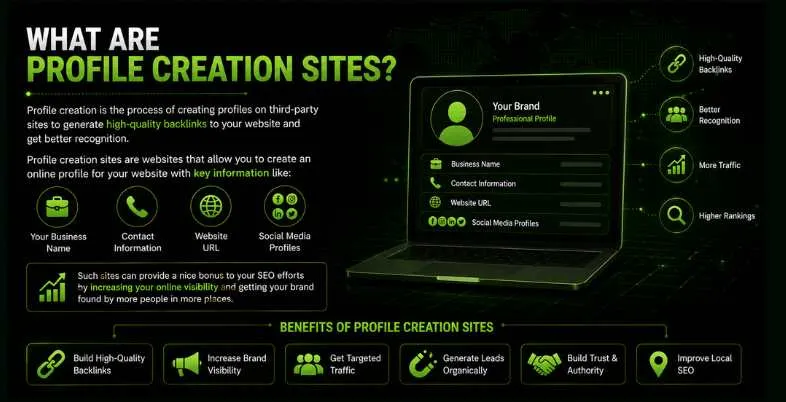
Profile creation is the process of creating profiles on third-party sites to generate high-quality backlinks to your website and get better recognition. Profile creations are a type of off-page SEO technique that can help your site earn more traffic and improve its rankings in the search engine results pages (SERPs).
Profile creation sites are websites that provide an opportunity to create an online profile for your website with key information such as:
- Your business name
- Contact information
- Website URL
- Social media profiles
Such sites can provide a nice bonus to your SEO efforts by increasing your online visibility and getting your brand found by more people in more places.
Types of Profile Creation Sites
Understanding the different types of profile creation sites is important to maximise the benefits of off-page SEO. Each type serves a specific purpose and targets different audiences.
Social Media and Community Platforms
These are the most frequently used websites for building profiles. You can build detailed profiles on platforms such as Facebook, LinkedIn, Twitter and Reddit. Optimising them correctly results in creating sites with good DA, which aids in both making the brand more visible and improving search engine rankings.
Example: LinkedIn, Quora, Reddit
Business Listing and Local Directories
They are very helpful for improving your rankings in local searches. Sites like Yelp, Justdial, Sulekha and Yellow Pages allow businesses to register their profiles with the address, phone number, website and list of their services.
Example: Yelp, Foursquare, Crunchbase
Forum and Discussion Boards
Forum members in various niches can have a signature or bio, often featuring their site. These websites are less well-known, but they help you build authority within your area of expertise.
Example: Warrior Forum, Moz Community
Web 2.0 and Blogging Platforms
They allow users to make a full profile and publish a variety of content. If you want to add link building to your content marketing strategy, these are a great option.
Example: Tumblr, Medium, WordPress.com
Q&A and Review Sites
Services such as Quora or Trustpilot let you establish a profile and share your thoughts, ask for advice or post reviews. Such profiles are credible and facilitate the arrival of new visitors.
Example: Trustpilot, Quora
Benefits of Using Profile Creation Sites
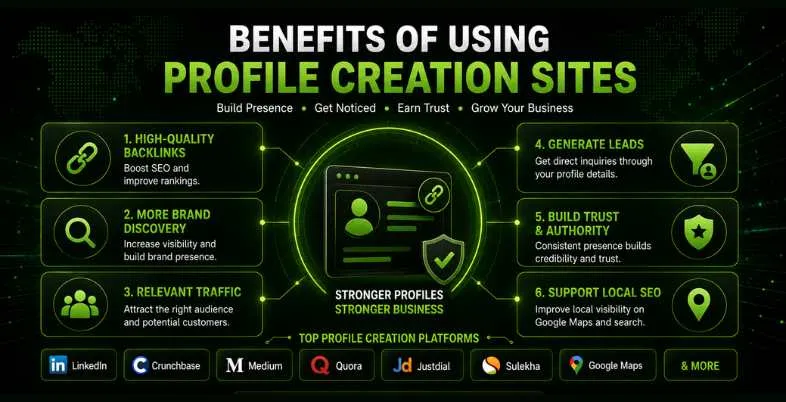
- You Get High-Quality Backlinks This is the biggest benefit. When you create a profile on a high-authority site like LinkedIn, Crunchbase, or Medium and link to your website, Google sees that as a positive trust signal — and your ranking improves.
- More People Discover Your Brand When you’re consistently present on multiple platforms, Google takes your brand more seriously. If someone searches your brand name, they’ll see not just your website, but also your LinkedIn profile, Quora answers, Crunchbase listing — all on the first page. That’s powerful credibility.
- You Get Relevant, Targeted Traffic Someone browsing a business directory or searching Quora for answers is already interested in what you do. When they land on your profile and visit your website, they’re far more likely to become a customer compared to random visitors.
- You Generate Leads Without Paid Ads Your profile includes your phone number, email, and website. Interested clients can reach out directly. A properly optimised profile can generate genuine leads — completely free, no ad budget needed.
- You Build Trust and Authority If someone sees your brand on LinkedIn, Crunchbase, and Quora — they’ll naturally trust you more. Consistency across platforms creates a professional image. That’s why smart digital marketers regularly review and update their profile creation strategy.
- It Helps with Local SEO Many profile creation sites double as local directories. If you’re listed on Justdial or Sulekha with your accurate address, phone, and working hours, your chances of appearing in Google Maps and local search results go up significantly. For local businesses, this is a must-do.
Key Features of Profile Creation Sites
High Domain Authority (DA)
One of the main appeals of quality profile creation websites is their great Domain Authority that aree commonly trusted by search engines. Creating a profile on these sites adds valuable backlinks that support your SEO and website’s reputation.
Free to Use
It is possible to find free sites that allow you to create a full profile without paying. These services work well for people who run startups, blogs, freelance jobs or small enterprises looking to grow without spending money on paid directories.
SEO-Friendly Structure
These high DA profiles provide a space for including keywords in your profile text, business titles, tags, and categories. This way, you are listed in the on-site results and also in the search engine results. As a result, digital marketers often resort to the top profile creation sites 2026 to revamp good platforms that had an upper hand in search ranking before.
Easy Registration & Quick Approval
There’s usually no need for a lot of information, as most free profile-making websites just need an email and a few details to start. It is now possible to use Google or Facebook to log in to some platforms and speed up the whole process.
Backlink Opportunities
They allow you to add your website or blog URL, giving you dofollow or nofollow backlinks that support link-building strategies.
Customizable Profiles
Users can add bio, profile image, contact info, social links, and business descriptions, ensuring brand consistency.
NAP Consistency
They support the inclusion of Name, Address, and Phone Number, which is crucial for local SEO and business trust.
Social Media Integration
Most modern profile creation platforms are mobile-responsive, allowing users to view or edit profiles on any device.
Dofollow vs. Nofollow | Backlink Profile Difference
Every link a site gives you is either dofollow or nofollow.
Dofollow links pass SEO authority directly to your website. The linking site’s credibility benefits your site. These are more directly useful for improving rankings.
Nofollow links include a rel=”nofollow” tag that tells search engines not to pass authority. However, they still bring traffic. In 2026, Google treats them as a “hint” — meaning they can still have a positive effect on rankings in some cases.
A natural backlink profile should have roughly 60–70% dofollow and 30–40% nofollow links. If all your links are dofollow, Google may see that as unnatural and could penalise your site.
90+ Top High DA Profile Creation Sites List
100+ Profile Creation Sites with DA 80+
500+ Profile Creation Sites List for Backlink Building
Things to Remember Before Creating Profiles
Maintain Consistency Across All Sites
Having the same name, logo, contact information,, and website address on all your profiles helps keep your brand consistent. Whether you go for the top rated profile sites or a new free one, keeping your branding steady is essential for getting your business known and recognized by others.
Make a Professional Bio or About Section for review
Most websites where you join require you to write a short description or bio. Describe your company, mention what you do and offer a way for people to contact you in your paragraph. Make it easy for yourself by using the identical content on every profile-building site, saving time and having a consistent message.
Pick a Niche That Interests You
It’s very important to choose the right category when posting on business directories and forums. When your profile isn’t on the correct page, it might be harder for people to see you. Pick a website that matches your industry to ensure that more people will see you and users will engage with your profiles.
Craft a professional-looking logo for your business
Visuals matter. Having a sharp and professional profile picture or company logo helps people trust you. A lot of people on free sites don’t fill in this information, but it can make you appear trustworthy.
Check for DoFollow Backlinks
Use profile creation for off-page SEO sites that give you DoFollow backlinks for SEO. Having these types of links means SEO value is shared which may increase your site’s position in search engine results.
Avoid Duplicate Content
Don’t use the same content for every website you create your profile on. Make a few changes to your bio to ensure that your content is not the same, helping your SEO.
Verify Your Email and Profile
Certain websites need you to verify your email address before you can use your account. If you leave out this key process, your profile might not be searchable. Be sure to finish the verification process for maximum exposure.
How to Create a Profile Backlink (Step-by-Step)
A great and optimised profile on profile creation sites is more than just entering your name and website. The step-by-step guide below will help you create an affection profile..
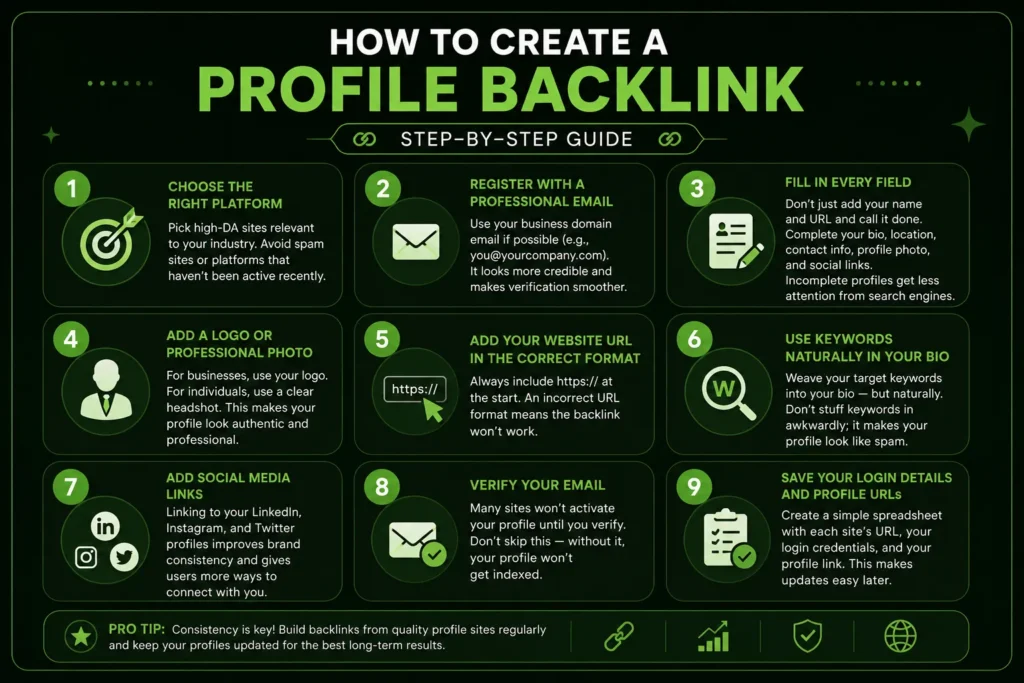
- Step 1 — Choose the Right Platform Pick high-DA sites relevant to your industry. Avoid spam sites or platforms that haven’t been active recently.
- Step 2 — Register with a Professional Email Use your business domain email if possible (e.g., you@yourcompany.com). It looks more credible and makes verification smoother.
- Step 3 — Fill in Every Field Don’t just add your name and URL and call it done. Complete your bio, location, contact info, profile photo, and social links. Incomplete profiles get less attention from search engines.
- Step 4 — Add a Logo or Professional Photo For businesses, use your logo. For individuals, use a clear headshot. This makes your profile look authentic and professional.
- Step 5 — Add Your Website URL in the Correct Format Always include https:// at the start. An incorrect URL format means the backlink won’t work.
- Step 6 — Use Keywords Naturally in Your Bio Weave your target keywords into your bio — but naturally. Don’t stuff keywords in awkwardly; it makes your profile look like spam.
- Step 7 — Add Social Media Links Linking to your LinkedIn, Instagram, and Twitter profiles improves brand consistency and gives users more ways to connect with you.
- Step 8 — Verify Your Email Many sites won’t activate your profile until you verify. Don’t skip this — without it, your profile won’t get indexed.
- Step 9 — Save Your Login Details and Profile URLs Create a simple spreadsheet with each site’s URL, your login credentials, and your profile link. This makes updates easy later.
Why NAP Consistency Matters for Profile Creation
NAP stands for Name, Address, Phone number. These three things must be exactly the same across every profile you create. Even a small difference — like writing “Pvt Ltd” on one site and “Private Limited” on another — can confuse search engines.
In 2026, Google checks NAP signals from 40+ directories when verifying a business’s credibility. Inconsistent information can negatively impact your local ranking.
Rules to follow:
- Use the exact same business name everywhere. “Co.” and “Company” are treated as different.
- Don’t let even one word differ in your address.
- Use a consistent phone number format everywhere (e.g., +91-XXXXXXXXXX).
- Use one consistent version of your website URL — either with “www” or without.
- Audit your profiles every 3 to 6 months and update anything that’s outdated.
Google Business Profile: The #1 Free Business Listing for Local SEO
If you’re only going to create one profile for local SEO, make it your Google Business Profile (GBP). It’s free, powerful, and puts your business directly on Google Search and Google Maps.
Research shows that a business with an optimised GBP gets 7x more visibility than one without. Business listing and profile platforms that add photos to their profile receive 42% more direction requests.
Setup takes about 15 minutes. Add your business name, category, address, phone, website, and working hours. Then make a habit of responding to reviews. Google rewards businesses that actively engage.
How to Submit Your Site to Google in 2026 (via GSC)
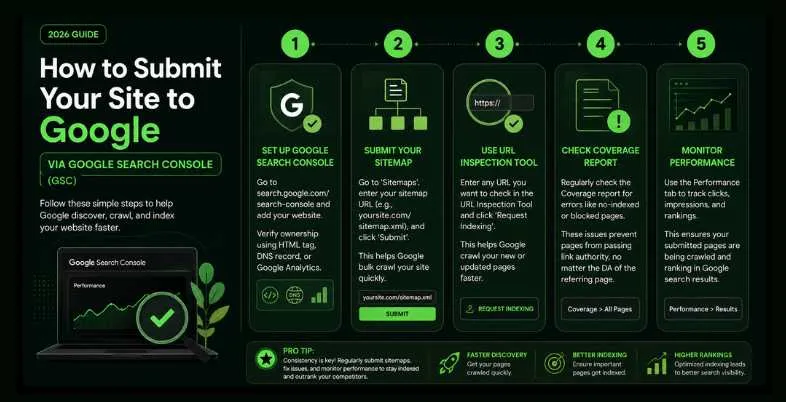
- To set up your Google Search Console account, you need to go to search.google.com/search-console and then add your website with the relevant verification method (HTML tag, DNS record, Google Analytics).
- To submit your sitemap through Google Search Console go to ‘Sitemaps’, enter your sitemap URL (for example, yoursite.com/sitemap.xml), and click ‘Submit’ so Google can bulk crawl your site as quickly as possible.
- You should use the URL Inspection Tool by entering any URL you wish to check and clicking the ‘Request Indexing’ button so Google can crawl your new profile backlink pages or updated content as fast as possible.
- You should regularly check the Coverage report to make sure there aren’t any errors, such as no-indexed or blocked pages, because these will not pass any backlink authority regardless of the Source Domain Authority (DA) of the page linking to you.
- Lastly, you can use the Performance tab to view your clicks, impressions, and rankings to determine that your pages that you submitted to are still being crawled by Google and ranked in their search results.
How to Check If Your Backlinks Are Being Indexed
Creating profiles is only half the job. You also need to confirm that Google has actually indexed those pages. Here’s how:
- Add your site to Google Search Console at search.google.com/search-console
- Submit your sitemap (go to the Sitemaps section and enter yoursite.com/sitemap.xml)
- Use the URL Inspection Tool to check the status of specific profile page URLs
- Click Request Indexing to manually push new profile backlinks to Google
- Check the Coverage report to make sure there are no errors
You can also search site:yourprofileURL directly on Google to see if it’s indexed. Tools like Ahrefs and SEMrush give you this information too.
Tips To Effectively Use Profile Creation Sites
Choose Reputable and Relevant Sites
Look over the trusted social media or SEO directories to choose the best ones. Try to build your high DA profile on sites that relate to your field or niche. Keeping profiles current on business sites means more authority backlinks and higher leaves in search engine results.
Always Complete Your Profile 100%
The majority of users create a simple profile that they do not complete. This is a missed opportunity. Be sure to fill in every part of the form when making a free profile on an SEO site.
- Name or Brand Name
- Business Description
- Website URL (with correct format)
- Email and Contact Info
- Logo or Professional Profile Picture
- Social Media Links
A detailed profile improves how credible and professional you come across.
Write an Optimised, Unique Bio
Having an impressive bio on your profile is very important. Extend your list of keywords by adding a concise paragraph about what you do. Add terms such as free profile and directory sites creation websites, top profile creation sites for 2026 or any words specific to your industry to the content smoothly. Don’t stuff your website with keywords and concentrate on easy-to-understand and worthwhile content.
Ensure Consistency Across All Profiles
Include the same business NAP on all websites for profile creation. If you maintain one consistent business name, users and search engines won’t end up confused.
Watch the Performance of Your Website Links and SEO
You can use Google Search Console or Ahrefs to monitor how your profiles are affecting your search engine visibility. Target the sites that give your business high levels of traffic and backlinks.
Engage When Possible
When the site offers chances to comment, post or review, try to keep participating once in a while. Having an active profile helps your business succeed and earn respect from potential clients.
Update Profiles Regularly
Business details change. Set a reminder to keep going to your old free profile creation websites and correct or update anything that’s outdated.
Common Mistakes to Avoid
Incomplete Profile Information
Not giving enough information sometimes leads others to think you’re hiding something. A profile without all the information could seem amateurish and miss being accepted by search engines. No matter if you create your profile on a big profile site or a related directory, you should always provide the following:
- A clear profile name
- A keyword-rich bio
- Website URL
- Logo or image
- Social media links
Skipping any of these details weakens your profile’s SEO value.
Copy-Pasting the Same Bio Everywhere
Creating a profile everywhere can result in your work being categorised as duplicate by large search engines. Search engines may view it as spam. However, make slight changes to your description on every platform to make it special, regardless of what remains the same in your message.
Choosing Low-Quality or Irrelevant Sites
There are not many profile creation sites that you should bother with. Do not use platforms if they have a low domain authority, plenty of ads or average content that does not interest you. Use sites that are trusted and fit your business category to help build your profile. Bad-quality marketing platforms can be more damaging than helpful to your SEO.
Ignoring the Website URL Format
Always remember to include https:// in the URL you provide when using any links. With incorrect links on many profiles, you don’t get the chance to build backlinks through using free profile websites.
Keyword Stuffing
Overuse of keywords on your profile may make your profile a target for spam or cause it. Compared to using SEO terms, make sure your bio is readable and easy to understand before anything else.
Not Verifying Your Profile
Many sites that help you create profiles need you to confirm by email or phone. If you don’t complete it, your profile might not be active. Always click on the link you get in the verification email to confirm your account.
Conclusion
Profile creation sites are a simple, low-cost, and genuinely effective SEO tool. If you choose the right platforms, fill out your profiles completely, keep your NAP consistent, and update things regularly — it becomes one of the best bang-for-your-buck strategies available.
In 2026, this technique absolutely still works. The key is being smart about it. Instead of mass-submitting to hundreds of random sites, focus on a smaller number of high-quality platforms and do those well.
Start today. Begin with the big ones — LinkedIn, Quora, Crunchbase, and Google Business Profile. Build your profile ecosystem gradually, and the results will follow.
Frequently Asked Questions
What are profile creation sites in SEO?
Profile creation sites allows you to create an online profile that links back to your website allowing other users to see your website URL and thus gives additional links back to your site as off-page SEO, increases your brand presence online, and increase your domain authority.
Do profile creation backlinks still work in 2026?
Yes, profile creation backlinks will still be effective in 2026 as long as you create them on high DA(reputation), relevant sites, and still have diverse backlinks to your site.
How Many Profile Links Should You Build Per Month?
Quality matters far more than quantity. A rough guide:
- New websites: 10 to 20 profile backlinks per month from high-DA sites is plenty.
- Established websites: 30 to 50 per month is considered safe.
Spread your submissions out week by week — don’t do everything in one burst. Mix high-DA sites, niche directories, and social media platforms.
According to an Ahrefs 2026 report, pages that rank in Google’s top 3 results have an average of 92 referring domains pointing to them. A healthy backlink portfolio is non-negotiable.
Are there any free profile creation websites available?
You can use many free websites to set up a profile when creating a brand. Both startups and bloggers can use these platforms easily and for no cost to increase their online visibility and receive backlinks. You should only trust genuine websites with a good domain authority.
What is the difference between dofollow and nofollow profile backlinks?
Dofollow backlinks pass through link equity (SEO authority) to your site. Nofollow backlinks do not pass direct authority to your site, but they will still generate traffic to your site & help maintain a portfolio of class a (real) backlinks, which is considered natural & is Google compliant.
How do I check if my profile's backlinks are indexed by Google?
The first method is using Google Search Console URL Inspection Tool. The second method is using Google and searching ‘site:profilepageURL’. There are also a number of different tools available (Ahrefs/SEMrush etc.) that can quickly identify if your profile backlinks are being indexed by Google.