
Marketing teams manage endless tasks—campaigns, calendars, and client briefs—often across scattered tools. Visual collaboration techniques simplify this chaos, making content production smoother and more creative.
From brainstorming ideas to organizing workflows visually, these strategies foster teamwork and clarity in distributed settings.
Read on for actionable methods to streamline your marketing process while enhancing collaboration across teams.
What is Visual Collaboration in Marketing?
Visual collaboration in marketing refers to that incorporates visual components involves the use of visual elements such as whiteboards, flowcharts, dashboards, and design software to develop, plan, and manage marketing content. In contrast to text-based approaches, visual marketing collaboration utilizes visual elements to facilitate idea generation, mapping, and collaboration during marketing content creation.
Key Points:
- Assists marketing teams in communicating their ideas visually via charts, boards, and prototypes
- Facilitates clear communication and understanding among marketing, design, and content teams
- Allows for real-time collaboration, particularly for remote workgroups
- Boosts content development and approval efficiencies
- Minimizes miscommunications by providing greater visibility into workflows
- Favors visual marketing collaboration tools such as digital whiteboards and design platforms
Why Visual Collaboration Matters in 2026
Marketing teams today work at an accelerated pace, remotely, and using different channels. The importance of visual collaboration lies in its ability to facilitate fast alignment between team members, minimize communication issues, and expedite content creation. In light of increased requirements for real-time campaign implementation and data analysis, solely dependent text-based collaboration cannot be effective anymore.
Key Points:
- Fast content creation – Visual workflows enable teams to implement campaigns effectively and quickly
- Effective remote collaboration – Perfect for teams distributed geographically
- Enhanced clarity and alignment – Visual collaboration prevents misunderstandings and ensures agreement
- Real-time reviews and approval – Immediate reviews and edits are possible
- Data-driven decisions – Dashboards provide visual analysis and reports
- Increased efficiency – Enhanced process efficiency and minimized delays
Mapping Campaign Ideas with Mind Mapping Tools

Mind mapping tools help marketers visualize campaign ideas and organize concepts in a structured format. Teams can outline core themes, supporting details, and creative directions all in one place.
These tools allow for easy rearrangement of ideas as priorities shift or new marketing strategies emerge.
During content planning sessions, teams benefit from creating branches for topics like audience segments, key messaging, promotional channels, and timelines.
This clear visual structure ensures everyone aligns on the campaign’s objectives from the beginning.
Here’s how mind mapping enhances campaigns:
- Categorizes complex concepts into digestible sections.
- Simplifies brainstorming with drag-and-drop reorganization.
- Links related documents or media directly to map points.
- Supports real-time collaboration across remote teams.
Marketers who adopt this approach often experience fewer miscommunications while increasing creative output by ensuring every idea has a defined space within their planning framework.
Using Online Whiteboards for Collaborative Planning

Online whiteboards create an accessible space for teams to brainstorm, organize strategies, and plan campaigns. They help visualize ideas and streamline discussions, especially when working with distributed team members.
Marketers can easily map out workflows or set up content priorities in real time without losing track of input from collaborators.
For instance, with the interactive whiteboard from Canva, marketers can host engaging workshops using Canva’s features (such as customizable shapes, automatic connectors, colorful cursors, and unlimited space).
These tools make planning intuitive while keeping sessions dynamic.
Why do online whiteboards enhance collaboration? They:
- Centralize all ideas into a single visual workspace.
- Simplify complex plans through drag-and-drop elements.
- Encourage real-time participation from remote contributors.
These platforms improve efficiency while ensuring creativity thrives throughout the planning process.
Storyboarding to Shape Your Content Flow
Storyboarding gives marketers a clear visual outline of their content flow. It allows teams to plan each step in the audience journey, ensuring every piece of content aligns with the campaign’s objectives. From initial concepts to final execution, storyboards offer structure and clarity.
Teams can arrange frames or sections for blog posts, social media assets, video scripts, or email sequences.
Each element becomes easier to evaluate and adjust before production begins.
Here are some advantages of storyboarding:
- Clarifies how content fits within the overall strategy.
- Identifies gaps or redundancies early in planning.
- Facilitates feedback on creative direction before full execution.
This approach saves time while helping marketers produce more cohesive campaigns with purpose-driven storytelling at every stage.
Annotating Visual Assets for Streamlined Feedback
Annotating visual assets ensures feedback is specific, actionable, and easy to follow. Teams can mark up designs directly with comments, highlight problem areas, or suggest edits without lengthy email chains or confusing notes.
This method helps clarify expectations between designers and stakeholders.
Marketers reviewing assets like social graphics or video thumbnails can pinpoint exact details that need revision instead of offering vague suggestions.
Benefits of using annotation tools? Well, they:
- Reduce misunderstandings by providing clear visual context.
- Speed up revisions with targeted input on design elements.
- Keep all feedback organized in one accessible location.
Streamlining feedback workflows with annotations helps marketing teams finalize creative projects faster while improving the quality of the final product through collaborative clarity.
Creating Digital Mood Boards to Inspire Teams
Digital mood boards allow marketers to collect and present inspiration for campaigns in one cohesive visual format.
Teams can compile images, color palettes, fonts, or sample designs that align with the campaign’s theme or brand identity.
These boards foster creativity by providing a clear reference point during brainstorming or production phases.
Marketers can ensure everyone shares a unified vision before diving into content creation.
Why are digital mood boards effective? They:
- Organize creative assets for easy access and review.
- Help visualize the desired aesthetic of a campaign.
- Encourage team alignment on style and tone early on.
Using digital mood boards helps spark ideas while ensuring consistency across all campaign elements from concept to execution.
Building Kanban Boards to Organize Tasks Visually
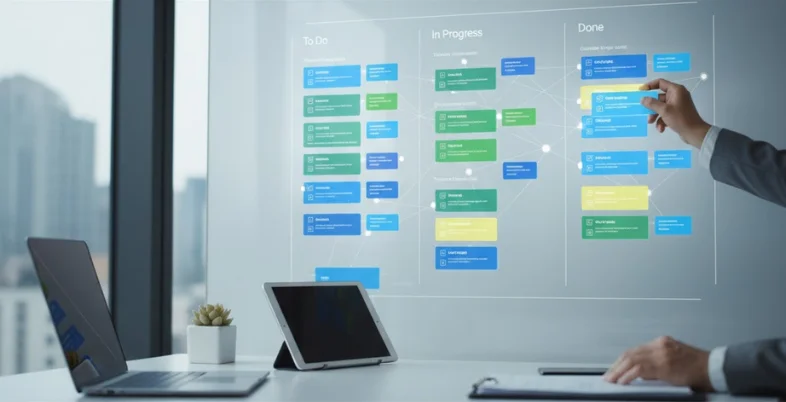
Kanban boards provide a simple yet effective way for marketing teams to track tasks and manage workflows. By organizing work into columns like “To Do,” “In Progress,” and “Completed,” teams can easily monitor project progress at every stage.
Marketers can assign cards for individual tasks, attach files, or set due dates. This ensures transparency while helping prioritize workloads across team members.
Why Kanban boards are useful:
- Visualizes project stages clearly for all contributors.
- Helps identify bottlenecks in workflows quickly.
- Ensures accountability by assigning specific task owners.
Using this method keeps projects organized and allows marketers to focus on meeting deadlines without losing sight of the bigger campaign objectives.
Hosting Real-Time Polls and Interactive Sessions in Brainstorming Platforms
Real-time polls and interactive sessions boost engagement during team brainstorming. These tools let marketers quickly gather input, prioritize ideas, or vote on creative directions without long discussions. This ensures everyone participates, even in distributed teams.
Poll results provide immediate clarity when deciding between content concepts or campaign approaches.
Paired with live discussion features, they make collaboration faster and more productive.
How real-time interaction adds value:
- Encourages equal contribution from all team members.
- Speeds up decision-making by gathering instant feedback.
- Keeps brainstorming focused and goal-oriented throughout sessions.
Leveraging these interactive elements helps marketers generate actionable ideas while maintaining a dynamic environment for creativity to thrive during collaborative meetings.
Integrating Video Collaboration Features for Content Reviews

Video collaboration features allow marketing teams to review and refine content more effectively. These tools let users provide live feedback on video drafts, scripts, or animations while discussing changes in real time.
Marketers can pause videos to comment on specific frames, ensuring precise adjustments.
Collaborative video sessions also help bridge communication gaps between creators and stakeholders.
Benefits of using video collaboration? They:
- Ensure clear direction with frame-specific comments.
- Speed up approval cycles by resolving edits instantly.
- Enhance communication through live discussions during reviews.
Incorporating these features into content workflows streamlines revisions and ensures high-quality outputs that align with the campaign’s vision without delays caused by miscommunication or lengthy back-and-forth exchanges.
Managing Deadlines with Visual Timelines
Visual timelines help marketing teams track deadlines and milestones clearly. They offer a straightforward way to plan campaign stages, from brainstorming to final execution, while ensuring no step is overlooked.
Marketers can assign specific dates to tasks or deliverables, aligning team efforts with the overall schedule.
Adjusting timelines as priorities shift ensures flexibility without disrupting progress.
Why are visual timelines effective? They:
- Highlight key milestones for better time management.
- Prevent delays by keeping everyone aligned on deadlines.
- Simplify tracking of overlapping projects within campaigns.
Using visual timelines keeps campaigns organized and ensures teams meet their objectives on time while staying focused on producing impactful content at each stage of production.
Real-Life Applications in Marketing
- Campaign Planning – Boards for idea mapping, timing, and planning execution process
- Content Calendar Planning – Planning social media posts, blogs, and marketing campaigns visually
- Social Media Planning – Planning creatives, copy, and social posts calendar at once
- Customer Journey Planning – Visualizing the journey from brand awareness to conversion
- Collaboration in Creative Design – Working collaboratively in the design and visuals process
- Ad Campaign Management – Visual tracking of ads, approvals, and performance management
- Landing Page Planning and Website Planning – Visualization before starting web development
- Brainstorming – Collaborative brainstorming using virtual whiteboards
- Campaign Performance Analysis – Dashboards for visual performance analysis
- Content Approval – Efficient content approval process with visualization applications
The Takeaway
Adopting visual collaboration techniques transforms how marketing teams work together. By improving creativity, organization, and communication, these tools empower teams to produce better content efficiently.
Start integrating these approaches into your workflows to boost productivity and foster stronger collaboration—helping your campaigns achieve both creative excellence and measurable results with ease!
FAQs
What is visual collaboration in marketing?
This refers to visualizing marketing activities through boards, diagrams, etc.
Which tools can be considered as best for content collaboration?
The best tools for the purpose are Miro, Figma, Canva, and Notion.
How could teams accelerate content creation?
Content creation speed could be accelerated through well-defined workflows, visualizing the task, and collaboration.
Provide some examples of visual collaboration.
Examples of visual collaboration in marketing include campaigns visualization, content calendar planning, customer journey mapping, and designs visualization.
Why should collaboration be considered an essential tool for marketing?
Collaboration allows teams to align their efforts towards better and error-free content development.