
As it leads to audience reach and internet visibility through its effective distribution. Traditional content platforms such as blog posts and social media posts and articles are popular but content marketers should not neglect the great value of PDF documents. The PDF format provides flexibility to deliver deep content because it supports eBooks alongside whitepapers and presentations and case studies. What strategies allow you to direct your valuable resources toward the target audience while advancing your complete online strategy? Such information can be disseminated successfully through submission sites.
PDF submission sites function as digital document repositories where users can upload and share files and discover available PDF content while enabling content distribution together with lead collection and important search engine optimization functions.
What Are PDF Submission Sites?
PDF submission sites are online platforms where you can upload and share PDF documents. Think of them like YouTube — but for documents instead of videos.
Anyone can search these sites to find content on topics they care about. When you upload your PDF, it becomes discoverable to thousands of new readers who might never have found your website on their own.
- eBooks — Long-form guides or educational books
- Whitepapers — In-depth research or analysis on a topic
- Case Studies — Real examples of problems you solved for clients
- Presentations — Slide decks from webinars or events
- Brochures and Flyers — Marketing materials for your products or services
- Research Papers — Academic or scientific findings
- Manuals and Guides — Step-by-step instructional documents
- Templates and Checklists — Tools that help people complete tasks
These websites let users search for content through specific categories along with tags and keywords which enables them to access a wide range of topics. Such PDF submission websites provide their users with tools for document embedding and social sharing functionalities while allowing users to track document downloads. PDF content creators and marketers can make their valuable documents reach new audiences by utilizing these platforms that increase potential website traffic to their main online presence.
Why Should You Use PDF Submission Sites?
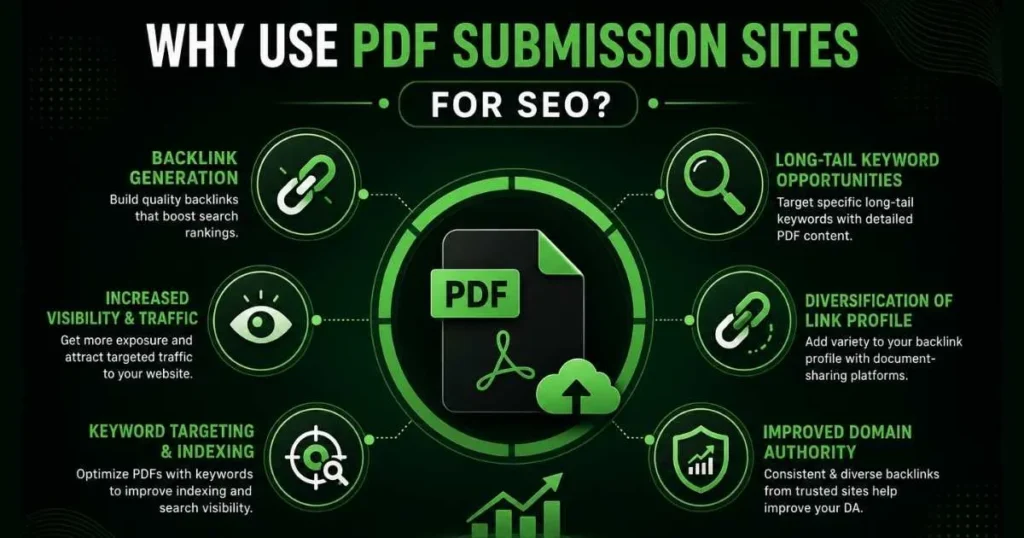
The main role of these submission sites advocates content sharing but they deliver multiple SEO benefits that make them an important element for comprehensive SEO approaches.
1. Content Distribution and Reach
Your website can only reach so many visitors on its own. PDF platforms already have large, active audiences. When you publish your document there, people who’ve never heard of you can discover your content.
This is especially useful for niche topics. If your PDF covers a specific subject, there’s likely an audience on these platforms actively searching for it.
2. Generate Leads
PDFs are great lead magnets. Many businesses use them to collect contact details — someone fills out a short form to download your guide, and now you have a qualified lead.
Whether it’s through a gated download on the platform itself or a link back to your own landing page, PDFs help you grow your email list with people who are already interested in your topic.
3. Build Your Authority
When you share well-researched, detailed PDFs on trusted platforms, people start to see you (or your brand) as a reliable source of information. This kind of credibility is hard to build quickly — but consistent, high-quality document sharing helps a lot.
4. Store and Archive Important Documents
Need a safe, accessible place to store important documents? PDF submission sites work as a secondary archive. If your website goes down or you redesign it, your documents stay live and accessible on these platforms.
5. Learn What Competitors Are Doing
Many marketers overlook this one. Browse these platforms in your industry and you’ll quickly see what kinds of PDFs your competitors are creating, what topics they’re targeting, and what formats they prefer. That’s useful research for your own content strategy.
Do PDF Submission Sites Still Help SEO in 2026?
Yes — when used correctly.
Here’s how they contribute to your search engine rankings:
Backlinks to Your Website
Search engines like Google treat backlinks as a sign of trust. When a reputable platform links back to your website, it signals that your site is worth visiting.
PDF submission sites can provide both dofollow links (which pass ranking power to your site) and nofollow links (which still help create a natural, diverse backlink profile). The key is to choose platforms with high domain authority.
Your PDF Can Rank on Google Itself
Google can read and index the text inside PDF files, just like regular web pages. That means your PDF can appear directly in search results for your target keywords — giving you extra visibility beyond just your website.
More Relevant Traffic
These platforms attract people who are actively looking for detailed information on specific topics. If your PDF matches what they need, you’ll get highly targeted visitors to your website — people who are much more likely to convert into leads or customers.
Long-Tail Keyword Rankings
PDFs tend to go deep on topics. That depth makes them perfect for targeting long-tail keywords — specific, multi-word search phrases that are easier to rank for and often signal stronger buying intent.
For example, instead of targeting “content marketing,” a PDF might target “content marketing strategy for SaaS startups in 2026.”
A More Natural Link Profile
Google prefers websites that earn links from a variety of sources — blogs, news sites, forums, and yes, document-sharing platforms. PDF submissions add diversity to your backlink profile, which looks more natural and trustworthy to search engines.
Better Domain Authority Over Time
Each quality backlink contributes to your website’s overall authority. Over time, a consistent PDF submission strategy — combined with other link-building tactics — helps improve how search engines view and rank your site.
What to Look for in a Good PDF Submission Site
Not all platforms are equal. Here’s what separates a good one from a waste of time:
Feature | Why It Matters |
|---|---|
High Domain Authority (DA) | Backlinks from trusted sites carry more SEO value |
Easy upload process | Saves your time, fewer frustrations |
Categories and tags | Helps users find your document more easily |
Option to add backlinks | Essential for SEO benefit |
Social sharing buttons | Extends your document’s reach |
Download/view analytics | Lets you track what’s working |
Dofollow links | Directly boosts your site’s rankings |
Clean, spam-free environment | Protects your brand’s reputation |
Avoid platforms that are cluttered with low-quality content or have very low traffic. Publishing your document there won’t help — and could even hurt if Google associates your site with spammy domains.
Top 100 High DA PDF Submission Sites List
200+ More PDF Submission Sites for Backlink Creation
High Authority .EDU and .GOV PDF Submission Sites
These are the “gold medals” of backlinking because search engines view educational and government institutions as the ultimate authorities. Obtaining a link from these domains can significantly boost your site’s trustworthiness and ranking potential.
Below is a curated list of high-authority platforms where you can aim to host your documents.
Site Name | Authority Type | Impact Level | Link Type |
Academia.edu | .EDU Platform | Extremely High | Do-Follow/No-Follow Mix |
ResearchGate | Research/Academic | Very High | Contextual |
ERIC.ed.gov | .GOV / Education | Elite | Reference Link |
SlideShare (LinkedIn) | High DA Business | High | Do-Follow |
Scribd | High DA General | High | No-Follow |
Calameo | High DA Creative | Medium-High | Do-Follow |
University Repositories | Local .EDU | Very High | Institutional |
How to Optimize Your PDF Before You Submit It
Uploading a raw, unoptimized PDF is a common mistake. Take these steps first:
Do Keyword Research
Before you write (or finalize) your PDF, research what terms your target audience is searching for. Use free tools like Google’s “People Also Ask” section or keyword tools like Ubersuggest or Google Keyword Planner.
Include your primary keyword in the title, headings, and naturally throughout the body text. Also sprinkle in related (LSI) keywords — more on those below.
Write a Strong Title
Your title should clearly describe what the document is about. Keep it specific, include your main keyword, and make it interesting enough that someone would want to click on it.
Weak title: “Marketing Guide” Strong title: “Beginner’s Guide to Content Marketing: How to Get Traffic Without Paid Ads”
Format for Easy Reading
Use short paragraphs, clear headings, bullet points, and enough white space so the document doesn’t look like a wall of text. A well-formatted PDF keeps people reading longer.
Add Images and Charts Where Helpful
Visual elements make complex information easier to understand. Always give images descriptive file names and alt text that include relevant keywords.
Include Links Back to Your Website
Add links to your website inside the PDF itself — in the introduction, within the text where relevant, and at the end with a clear call to action.
If the platform allows a website URL field in the submission form, always fill it in.
Fill in Your PDF Metadata
Most PDF tools (like Adobe Acrobat or even Google Docs) let you add metadata to your file. Fill in the title, author name, subject, and keywords. These fields help search engines understand what your document is about.
Compress the File Size
Large files load slowly. Use a free tool like Smallpdf or ILovePDF to compress your file without losing quality. A smaller file means a better experience for your reader.
Proofread Before You Submit
Spelling mistakes and formatting errors make your document look unprofessional. Always read through your PDF one last time before uploading it.
Step-by-Step PDF Submission Process
The submission procedure for optimized PDFs involves basic steps on these sites. Here’s a step-by-step guide:
Step 1: Make a list of platforms
Search for “best PDF submission sites 2026” and collect a list of 10–20 platforms with high domain authority scores.
Step 2: Create an account
Most platforms require a free account. Register with your business email so you can track your submissions.
Step 3: Click "Upload" or "Submit"
After logging in you will find a clear button or link that has a label “Upload” or “Submit PDF” among others similar to them. You will find the submission form through this action.
Step 4: Upload your optimized PDF
Select your file from your computer and wait for it to upload.
Step 5: Fill in the submission form
Add a keyword-rich title, a clear description (2–3 sentences), relevant tags, and the right category.
Step 6: Add your website link
If there’s a URL or website field, add a link to a relevant page on your site. If the description allows links, add one there too.
Step 7: Agree to terms and submit
Read through the platform’s guidelines before submitting. Breaking their rules can get your account banned.
Step 8: Track your submissions
Keep a simple spreadsheet with the platform name, submission URL, date, and any notes. This helps you avoid duplicates and measure results over time.
Common Mistakes in PDF Submission
Even experienced marketers make these errors. Watch out for them:
- Submitting poor-quality content — A badly written PDF reflects poorly on your brand and earns you nothing from search engines. Quality matters more than quantity.
- Keyword stuffing — Repeating keywords too many times makes your PDF harder to read and can hurt your rankings. Aim for natural usage.
- Skipping metadata — Leaving the title, description, and keyword fields blank is a missed opportunity. Always fill them in.
- Wrong categories and tags — Mistagging your document means fewer people will find it. Be specific and accurate.
- Forgetting to add links — The main SEO benefit of PDF submission comes from backlinks. Don’t forget to include them.
- Submitting to low-quality sites — Ten submissions to high-DA platforms are worth more than 100 submissions to spammy directories. Choose quality over volume.
- Ignoring platform guidelines — Every site has rules. Read them before you submit.
- Not checking your analytics — If you never look at how your PDFs are performing, you won’t know what’s working or what to improve.
Conclusion
PDF submission sites prove to be a beneficial tool within your content distribution and SEO practices provided you use them wisely alongside properly optimized content. Sites for PDF submission provide users with an exclusive method to expand their audience reach while driving leads and strengthening authority while earning important backlinks.
Driving targeted website traffic through PDF submission site becomes achievable when you combine the understanding of their purposes with quality content optimization and mistake avoidance. The digital world demands content distribution diversity so sites for PDF submission emerge as an underutilized but effective tool to reach your marketing targets.
You Might Like to Explore:
FAQs
Do PDF submission websites help SEO in 2026?
Yes, they remain relevant because they help you build your digital presence in a completely new dimension while also providing powerful backlinks. By creating useful documents, you can get maximum benefit from these platforms in terms of SEO.
Are PDF submission sites still working for SEO in 2026?
Yes indeed they can still contribute to SEO when used effectively and with well-optimised PDFs as they do increase visibility and offer backlinks.
How can I get the best pdf submission site?
Seek for online communities having higher domain authority, user-friendly layout, related niches and good rate.
What are the features of an optimized pdf for submission?
Keyword rich content, amazing title, good formatting, correct backlinks, and optimized metadata.
How many backlinks can I get through PDF submission?
There is no strict limitation on the number of submissions, yet it is vital to pay more attention to the quality of the hosting website and the relevancy of the backlink rather than to quantity.